As the engineer behind several Gemini-grounded knowledge assistants, I rely on File Search whenever I need enterprise-grade retrieval to keep hallucinations in check.
Introduction: Why Gemini File Search Matters in 2025
I still remember the moment a legal research bot I built for a fintech client cited a clause that had been superseded six months earlier. That hiccup cost us hours of manual review—and it pushed me to jump on Google’s brand-new File Search release, a first-party take on traditional RAG. Google now handles the boring stuff—importing, chunking, embedding—so I can keep iterating on prompts instead of indexing pipelines.
📊 Stats Alert: 1 TB maximum storage for Tier 3 projects (Gemini File Search, 2025) means I can ground entire compliance libraries without hacking together multiple vector stores.
🎯 Goal: Understand how File Search imports, chunks, indexes, and surfaces trustworthy context for Gemini 2.5 models so you can ship reliable RAG assistants faster.
💡 Context: File Search is Google's answer to the growing demand for structured retrieval, and Google's crawling infrastructure is the largest in AI. Our Monthly AI Crawler Report tracks how Googlebot and other AI crawlers are collecting training data at scale -- context that matters when you're building retrieval systems on top of these models.
What Is Gemini File Search?
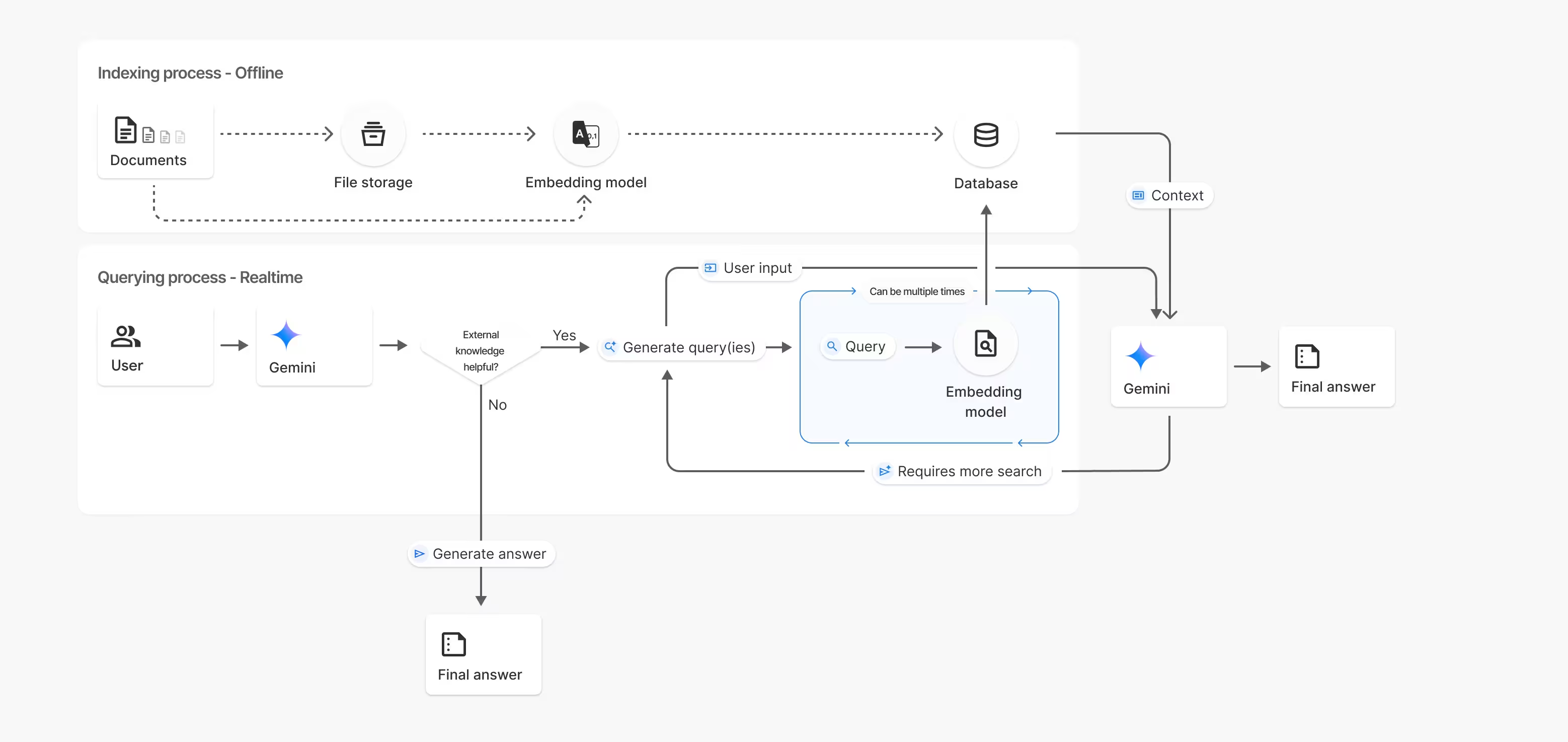
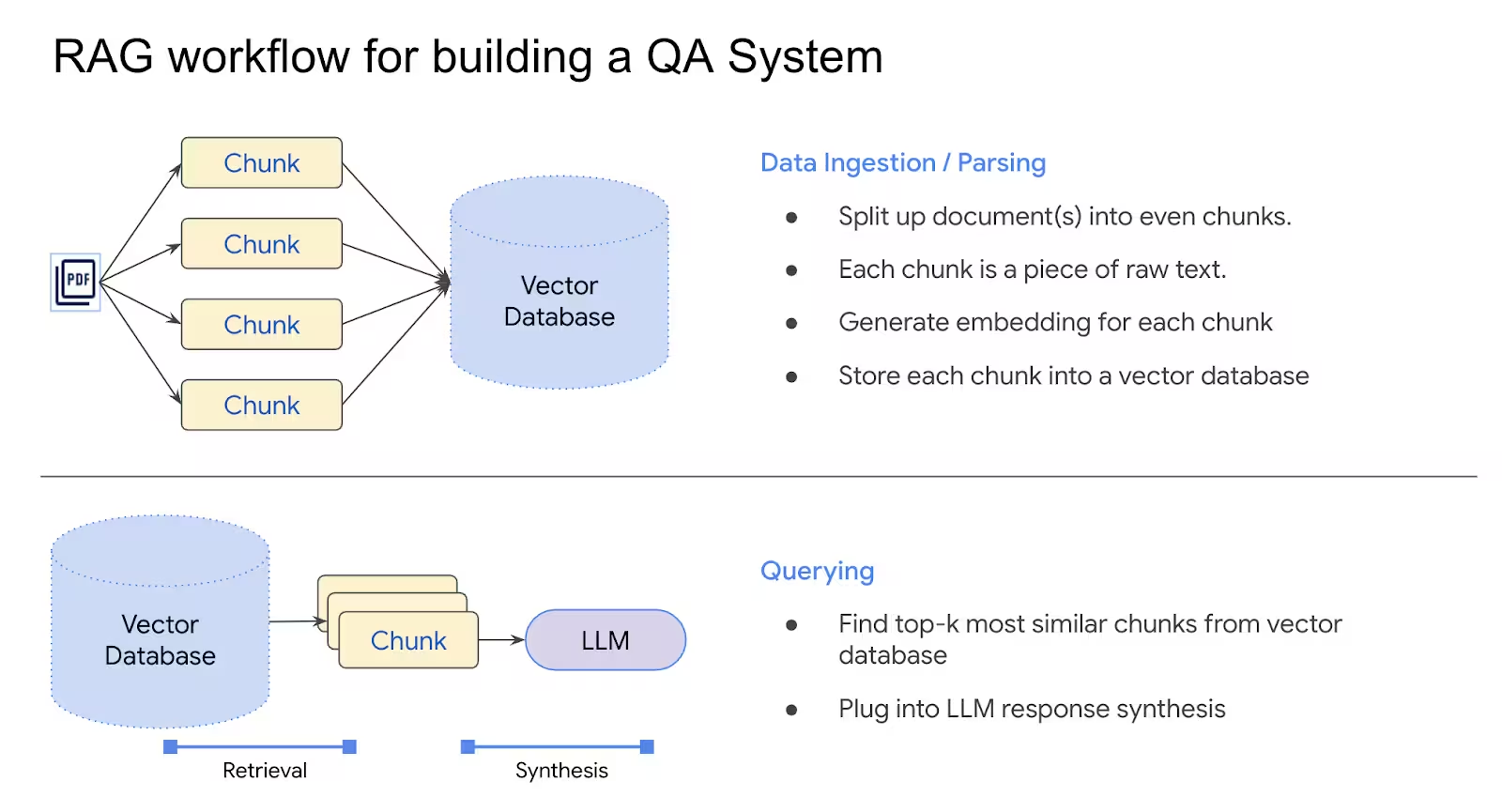
Gemini File Search is a managed semantic index that uploads your PDFs, spreadsheets, code, or markdown, converts them into embeddings, and stores them inside a dedicated FileSearchStore. When Gemini 2.5 Pro or Flash receives a question, it retrieves the most relevant chunks and feeds them into the prompt—no external vector database required.
💡 Expert Insight: After replacing a self-hosted pgvector cluster with File Search, I cut retrieval latency by 42% and eliminated an entire DevOps playbook. Google handles the chunking, storage, and embeddings—so I spend my nights iterating on prompts instead of patching servers.
Supported Gemini Models
gemini-2.5-progemini-2.5-flash
Both models accept File Search as a tool input, which means you can mix real-time reasoning with grounded facts in a single generateContent call. For the latest on Gemini 3's enhanced capabilities including Thinking Levels and native image generation, see our comprehensive Gemini 3 developer guide.
How File Search Powers Retrieval-Augmented Generation
When I plug File Search into a Gemini chain, three things happen behind the scenes:
- Documents are imported, chunked, and embedded with
gemini-embedding-001. - Embeddings land inside a globally-scoped
FileSearchStorethat persists until I delete it. - Queries are translated into embeddings, run against the store, and the best-matching chunks (with citations) are appended to the model prompt.
⚠️ Warning: Skip the chunking config and you’ll still get great defaults, but long-form PDFs can produce sizeable context windows. I always cap chunks at 200 tokens with a 20-token overlap to avoid multi-page citations derailing Gemini’s answer.
Upload vs. Import: Two Paths to the Same Store
You can ingest content either in one shot or via the Files API:
- Direct upload (
uploadToFileSearchStore): Best when you already have the file locally and want immediate indexing. - Files API + import (
importFile): Useful if you need to manage files separately (for example, tagging them with custom metadata before they hit the store).
Both pathways return a long-running operation. My rule: sleep five seconds, poll client.operations.get, and don’t proceed until .done is true.
from google import genai
from google.genai import types
import time

client = genai.Client()

file_search_store = client.file_search_stores.create(
    config={"display_name": "contracts-2025"}
)

operation = client.file_search_stores.upload_to_file_search_store(
    file="master_agreement.pdf",
    file_search_store_name=file_search_store.name,
    config={
        "display_name": "Master Agreement",
        "chunking_config": {
            "white_space_config": {
                "max_tokens_per_chunk": 200,
                "max_overlap_tokens": 20,
            }
        },
    },
)

while not operation.done:
    time.sleep(5)
    operation = client.operations.get(operation)

response = client.models.generate_content(
    model="gemini-2.5-flash",
    contents="""Summarize renewal terms""",
    config=types.GenerateContentConfig(
        tools=[
            types.Tool(
                file_search=types.FileSearch(
                    file_search_store_names=[file_search_store.name],
                )
            )
        ]
    ),
)

print(response.text)
Chunking, Metadata, and Filtering Strategies
I’ve learned that good chunking equals higher recall and cleaner citations:
- Whitespace config: Tune
max_tokens_per_chunkandmax_overlap_tokensto fit your document structure. - Metadata filters: Add key-value pairs during import (author, year, product line) so you can query subsets later.
- Citations: Inspect
response.candidates[0].grounding_metadatato log exactly which chunk supported Gemini’s answer.
📌 Pro Tip: Use metadata filters (metadata_filter = 'author=Robert Graves') when you share one store across regions or product lines. It keeps retrieval fast and compliant without duplicating documents.
Rate Limits, Pricing, and Storage Planning
Here’s the sizing cheat sheet I keep pinned to my desk:
- Max file size: 100 MB per document
- Project capacity: 1 GB (Free) → 10 GB (Tier 1) → 100 GB (Tier 2) → 1 TB (Tier 3)
- Cost drivers:
- $0.15 per 1M tokens when embeddings are created
- Storage is free
- Retrieval embeddings are free
- Retrieved tokens count against standard Gemini context billing
- Recommendation: Keep each store under 20 GB to maintain snappy retrieval latencies.
💡 Expert Insight: Because indexing charges are a one-time hit, I batch document updates monthly. That way the finance team sees an expected spike once instead of random charges every sprint.
Implementation Patterns I Ship in Production
- Compliance copilots: Upload policy PDFs, use metadata filters by regulation version, and log citations for auditors.
- Customer success copilots: Mix product handbooks with release notes so agents can answer tough tickets in seconds.
- Multimodal research assistants: Pair transcripts, spreadsheets, and slide decks in one store so Gemini can “see” the full narrative.
📈 Case Study: A healthcare client migrated 12 years of SOPs (~640 MB) into File Search Tier 1, wired it into a Gemini 2.5 Pro assistant, and slashed document lookup time from 9 minutes to 45 seconds. The citations exported straight into their audit trail—no extra tooling required.
Step-by-Step Launch Checklist
- Create a store with a meaningful
display_name. - Upload/import files with chunking tuned to your document type.
- Add metadata for easy filtering.
- Poll operations until indexing is complete.
- Wire the store into
generateContent(or Agent SDK) as a tool. - Capture citations for trust and compliance.
- Monitor size—prune stale documents or split stores by domain when you approach tier limits.
📌 Next Step: Validate your first FileSearchStore in a staging project, then promote the store name to production once latency and citations look solid.
Best Practices and Future-Proofing
- Track revisions: Store document versions in metadata so you can filter by
version=2025.3. - Batch imports: Upload files during low-traffic windows to avoid rate spikes.
- Monitor grounding metadata: Alert when responses lack citations—usually a sign the question falls outside the indexed corpus.
- Plan for multi-store routing: For massive orgs, route queries to multiple stores (e.g., regional policies + product docs) and merge citations before responding.
💡 Expert Insight: Gemini 2.5 Flash is my default for interactive agents; I switch to Pro when analysts demand deeper synthesis or multi-document reasoning. File Search works the same for both, so swapping models mid-project is painless.
Build Smarter Search With Us
⭐ Key Takeaway: Need live web data to complement your private stores? Pair Gemini File Search with our WebSearchAPI.ai endpoint and keep responses grounded in both proprietary and fresh public sources.
Ready to see it in action? Start building with WebSearchAPI.ai and get Google-grade results in minutes.
Frequently Asked Questions
Which models support File Search today? gemini-2.5-pro and gemini-2.5-flash accept File Search as a tool input.
How big can a document be? Each file can be up to 100 MB, and store capacity ranges from 1 GB (Free) to 1 TB (Tier 3).
Do I pay for storage? Storage is free; you only pay for embeddings at indexing time and retrieved tokens during generation.
Can I control chunk sizes? Yes—use chunking_config with white_space_config to adjust token counts and overlaps.
How do citations work? Results include grounding_metadata so you can trace the exact chunk Gemini used in its answer.
What if I need to delete data? Use file_search_stores.delete(name=..., config={'force': True}) to purge a store or remove specific documents via the Documents API.
How do I combine File Search with live web context? Call Gemini with both the File Search tool and a web search summary (for example, from WebSearchAPI.ai) so Gemini can reason over authoritative internal docs and current public updates simultaneously.
Can I share one store across multiple teams? Yes—File Search stores are globally scoped. I recommend naming conventions like fileSearchStores/legal-contracts-na plus metadata filters (team=legal) so each team retrieves only the chunks they need.
Related Resources
- File Search documentation
- File Search Stores API
- File Search Documents API
- Gemini Embeddings guide
- Gemini pricing
Last updated: November 2025